> For the complete documentation index, see [llms.txt](https://baseline11.gitbook.io/quick-guide/llms.txt). Markdown versions of documentation pages are available by appending `.md` to page URLs; this page is available as [Markdown](https://baseline11.gitbook.io/quick-guide/user-sign-in.md).
# User Sign In
1. Introduction
Welcome! This guide will walk you through the process of signing into your account quickly and securely.
2. System Requirements
To sign in, ensure you have:
* A stable internet connection
* A registered email address and password
* A web browser on a compatible device (PC, tablet, or mobile phone)
### The steps mentioned below are the process for user sign in:
{% stepper %}
{% step %}
## Logging into Your Account
1. Open your web browser
2. Go to our official website: [www.baseline11.com](https://www.baseline11.com/)
3. Click on the Sign In button
{% endstep %}
{% step %}
Logging into Your Account
1. On the sign-in page, enter your registered Email Address.
2. Enter your Password.
3. Click the Sign In button.
{% endstep %}
{% endstepper %}
3. Troubleshooting
1. **Issue: Forgot password**
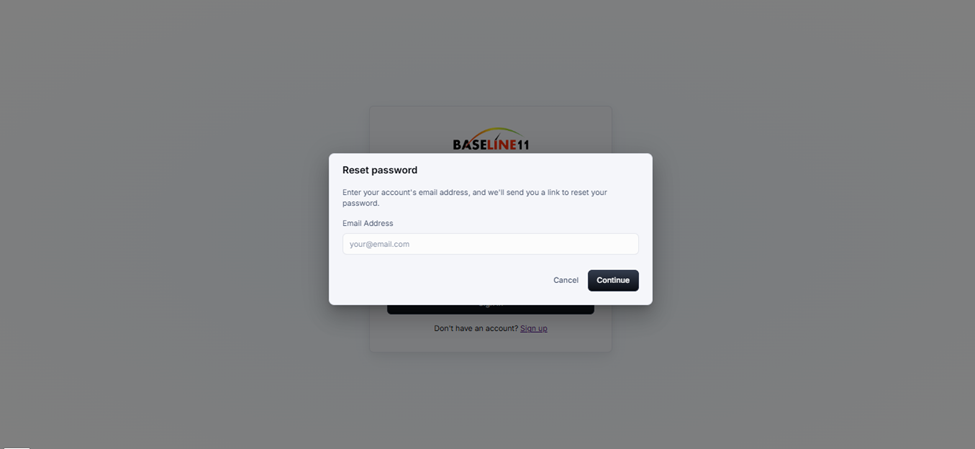
* Click on Forgot Your Password? on the sign-in page.
* Enter your registered email and click on the **Continue** button.
* Check your email inbox for an updated password.
* If you do not receive an email, check your spam/junk folder or request a new password reset.
* Once you receive a new password, return to the sign-in page and log in with your updated credentials.
2. **Issue: Incorrect email or password**
* Ensure there are no typos in your email or password.
* Make sure CAPS LOCK is off.
* Reset your password if necessary.